
PWMinder Desktop3.3.3 - Download
You'll be able to download in few seconds.
Publisher Description
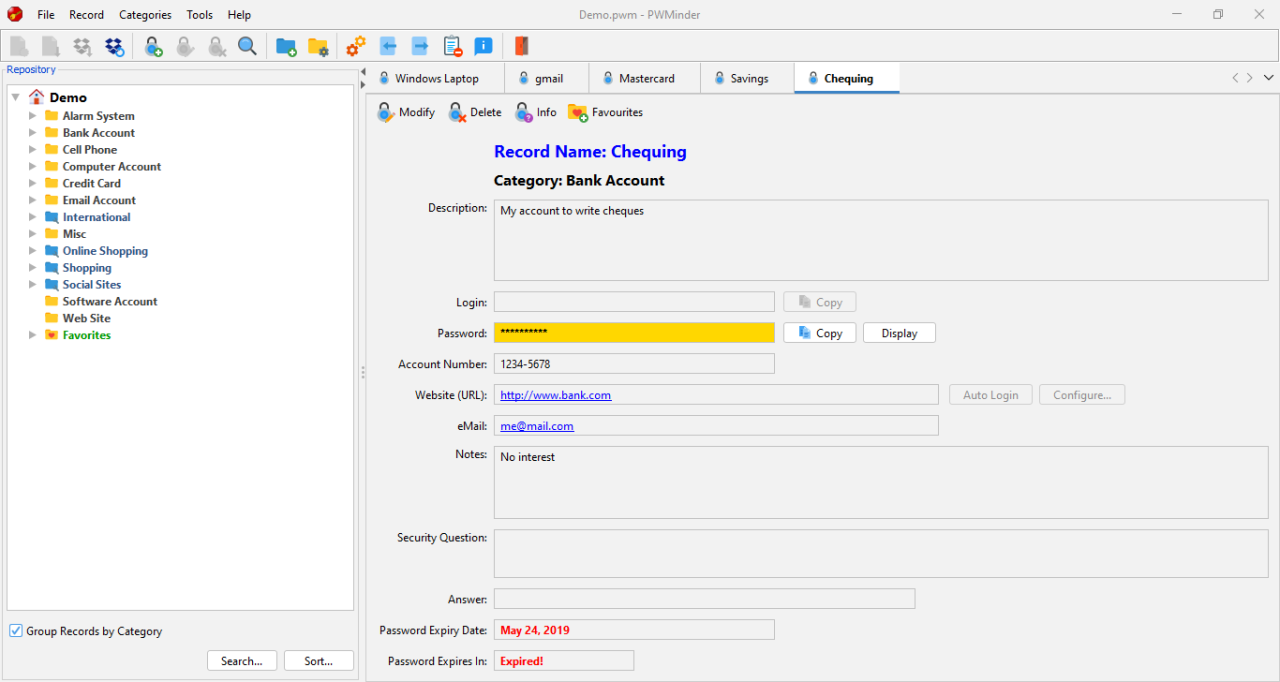
Personal security and privacy is becoming more and more of an issue, and it seems every web site, on-line store, on-line bank, social networking site, etc. asks you to create a login and password. We're told we should never re-use passwords, and password must not be something easily guessed. Most of us, however, don't follow these rules because there is no way we would be able to remember these dozens of unique, cryptic passwords. This is where PWMinder comes to the rescue!
PWMinder Desktop is a cross-platform, Password Manager application that is used to store all of your passwords and other sensitive data in a secure encrypted file. With PWMinder, you don't need to try and remember all of your various passwords, but rather create one very secure password, to be able access all of your other passwords in one place. Along with the PWMinder for iOS and Android, you can now manage your passwords at home and on the road.
PWMinder Desktop allows you to automatically log in to your favourite websites, and allows you to export and print all of your data. PWMinder also include a configurable Password Generator Tool, which allow you to create secure passwords. The latest version also includes a File Shredder, an Encryption Tool, and a Message Digest Tool, as well as better integration with Dropbox.
With the addition of PWMinder for iOS and Android and the use of Dropbox, your passwords become as mobile as your are. You can create a Repository of passwords on your Windows PC at work, then use PWMinder on your smart phone so you can access them the road. You can then open the Repository on your Mac, to access and edit your passwords at home. True Cross-Platform, Cross-Device compatibility!
About PWMinder Desktop
This Password Managers program is available in English. It was last updated on 29 September, 2026. PWMinder Desktop is compatible with the following operating systems: Windows.
The company that develops PWMinder Desktop is Ewert Technologies. The latest version released by its developer is 3.3.3.
The download we have available for PWMinder Desktop has a file size of 75.5 MB. Just click the green Download button above to start the downloading process. The program is listed on our website since 2023-12-03 and was downloaded 0 times. We have already checked if the download link is safe, however for your own protection we recommend that you scan the downloaded software with your antivirus. Your antivirus may detect the PWMinder Desktop as malware if the download link is broken.
How to install PWMinder Desktop on your Windows device:
- Click on the Download button on our website. This will start the download from the website of the developer.
- Once the PWMinder Desktop is downloaded click on it to start the setup process (assuming you are on a desktop computer).
- When the installation is finished you should be able to see and run the program.
Program Details
System requirements
Download information
Pricing
Version History
version 3.3.3
posted on 2023-12-03
Updated to Java 17.0.9
Added experimental support for Linux
Improvements to FlatLaf for Windows 11 (now uses Windows 11 rounded borders and drop shadows)
Better handling of lock files
Can automatically re-start on Windows, when Look and Feel Changes
Other minor updates and fixes
version 3.3.2.2.0
posted on 2023-01-31
Updated to Java 17.0.6
Improvements to FlatLaf on macOS using new FlatLaf macOS Theme (Theme uses macOS colors and looks more similar to native macOS Controls)
Removed support for VAqua (on macOS use FlatLaf instead)
Minor UI improvements to FlatLaf Look and Feel
Bug fixes and other improvements
version 3.3.2
posted on 2023-01-31
Updated to Java 17.0.6;
Improvements to FlatLaf Look and Feel;
Fixed upgrade checker;
Other minor updates and fixes;
version 3.3.2.2
posted on 2023-01-31
FlatLaf Dark/Light theme can now be automatically set based on the Operating System's Dark/Light setting.
Use JetBrains Mono for displaying Passwords.
Other fixes and improvements.
version 3.3.1
posted on 2022-11-24
Updated to Java 17.0.5;
Added Contact Support link in Help Menu;
Fixed: Publisher listed as 'unknown' in Windows Install;
Other minor updates and fixes;
version 3.3.0
posted on 2022-09-12
Updated to Java 17 (17.0.4.1),
Native support for macOS Silicon,
Removed support for VAqua _Look and Feel_ for macOS Silicon (not compatible),
Added new Look and Feel (FlatLaf) which has both Dark and Light mode,
Other minor updates and fixes
version 3.2.1
posted on 2021-07-08
Updated bundled JRE to Java 15 (15.0.3);
Updated Dropbox permissions and Authentication;
Other minor improvements and bug fixes.
version 3.2.0
posted on 2020-10-30
JRE bundle updated to Java 13;
Updated iconset;
Other minor improvements and bug fixes
version 3.1.3
posted on 2019-05-22
JRE bundle now use AdoptOpenJDK;
Improved Password Evaluator;
Other minor improvements and bug fixes
version 3.1.2
posted on 2018-06-05
Added ability to clear clipboard after copying passwords;
Fix for update checker
Disclaimer
External Download
We do not host PWMinder Desktop on our servers. We did not scan it for viruses, adware, spyware or other type of malware. This app is hosted by the software publisher and passed their terms and conditions to be listed there. We recommend caution when installing it.
The external download link for PWMinder Desktop is provided to you by apps112.com without any warranties, representations or guarantees of any kind, so access it at your own risk.
If you have questions regarding this particular app contact the publisher directly. For questions about the functionalities of apps112.com contact us.
